Image Formats, a Guide to Understanding Their Structure and Uses



Welcome to the wonderful world of image formats
Whether you’re designing for print, web, or crafting something unique, understanding image formats and files is essential. This guide will help you navigate the What, How, and Why of image formats — so you can make smart, creative, and cost-effective choices.
In an ideal world, you’d create your own image — whether it’s a photograph or a vector illustration. If you can, do it yourself or commission someone. A well-crafted image sets using the correct image formats set the tone for your entire project and can make or break the final result.
Image files fall into two broad categories:
- Photographic (Raster): Made of pixels — best for photos and detailed visuals.
- Drawn (Vector): Made of paths and shapes — ideal for logos, illustrations, and scalable graphics.
From there, your choice depends on:
- The software or hardware you have access to.
- Intended use (print, web, merchandise).
- File size and cost constraints.
Image formats, size does matters — larger files cost more to create, store, and use. But too small, and quality suffers.
Image Formats; Resolution refers to the density of pixels in a raster image, typically measured in PPI (Pixels Per Inch). More pixels = higher resolution = better quality.
Imagine you’re inside an old camera — limited to 256 colours and pixels the size of Lego bricks. Your photo would look like an 80s video game. Now, modern cameras offer millions of colours and microscopic pixels, producing sharp, vibrant images with rich dynamic range.
But more resolution isn’t always better. High-res images mean:
- Larger file sizes.
- Slower downloads.
- Higher storage costs.
 Balance is key — choose resolution based on your project’s needs.
Ask yourself:
- Will this image be printed or only viewed online?
- Does it need to be enlarged?
- Is it part of a product, a poster, or a website?
For online use, a good phone or bridge camera is often enough. But for print, especially large formats, low resolution will haunt you. You may need to retake the photo or compromise on quality.
💡 Rule of thumb:
- Web: 72–144 PPI, small file size (under 1MB, ideally ~250KB)
- Print: 300+ PPI, larger file size (8–15MB for A3)
Pixels are the tiny building blocks of raster images — each one holds colour and brightness data. Together, they form the full picture.
Think of them as digital mosaic tiles.
The more tiles you have, the smoother and more detailed the image.
Pixels are generated when you:
- Take a photo with a digital camera or phone.
- Scan a physical image.
- Export artwork from software like Photoshop or Procreate.
You don’t “draw” pixels manually — they’re created by your device or software based on resolution settings.
Because choosing the right format, resolution, and size saves you:
- Time (no need to redo work).
- Money (no wasted printing or storage).
- Headaches (no blurry, pixelated results).
Remember the Pees:
Proper Planning Prevents Piss Poor Performance!
Image Formats let’s have a close look at those pesky pixels and DPI.

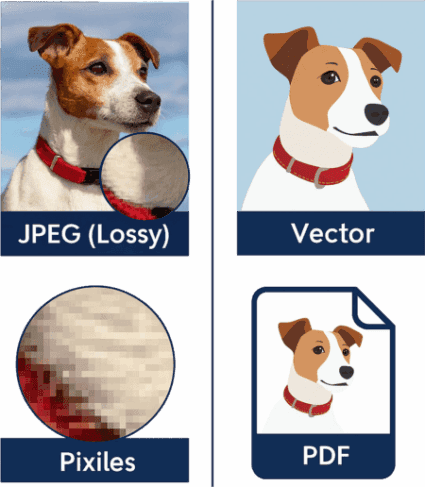
The image above is a Rasterized JPEG file – Shown at 440dpi then 72 dpi, followed by an enlargement of the white box area. You will see a grid of squares, these are the individual pixels that make up the finished image.

All the images (Blue Stars) above are Vectors. On the left is the original blue star, complete with a small red box on the left tip of the star. The star has been duplicated and scaled slightly larger each time. There are no pixels
to see, only a colour fill within the boundaries of the Vector’s paths, that form the star.
Please note; the only way to upload this image on to this page, was to export the original vector as PNG file. This a graphic example of the original vector file .
Image Formats – A Selection of Popular File Types
- Vectors (SVG files) are at the very core of graphic design – Many crafters use them without knowing there true worth. The “Paths” that are created in a vector hold all the instruction needed for a cutting machine to work
and cut the shape you want. These paths are used in CNC machinery to command the path of the cutters.
- The only thing Vectors do not do, is photographic images – Vector that can be resized infinitely, with out any loss of detail. Jpegs use pixels (little dots) and can rarely be enlarged without a loss of quality.
- Made of paths and shapes, not pixels
- Can be resized infinitely without losing sharpness Perfect for print, signage, and responsive design Not suitable for photographs
Image formats –Think of it as: The blueprint — precise, flexible, and resolution-independent.
· Uses lossy compression to reduce file size Great for web use and fast loading
· Slight quality loss when edited or saved repeatedly Not ideal for transparency or sharp edges
Image formats –Think of it as: A snapshot — beautiful, compact, but not built for endless edits.
· Supports transparent backgrounds Lossless compression — no quality loss Larger file sizes than JPEG
· Ideal for web graphics, icons, and overlays
Image formats -Think of it as: A sticker — sharp, clean, and ready to layer.
· Supports animation frames Limited to 256 colors
· Lossless compression for small files Great for web memes and icons
Image formats – Think of it as: A flipbook — simple, fun, and looping.
· Supports lossless compression or no compression Large file sizes
· Maintains image quality for editing and archiving
· Widely used in publishing and photography
Image formats -Think of it as: A master copy — detailed, heavy, and ready for the pros.
· Large file sizes due to no compression Basic format supported by many programs Not ideal for web use
Image formats –Think of it as: A raw sketch — straightforward but bulky
· Supports both lossy and lossless compression Can include transparency like PNG
· Smaller file sizes than JPEG and PNG for similar quality
· Increasingly supported by modern browsers and platforms
Image formats –Think of it as: A smart chameleon — compact, versatile, and ready for the web.
· Uses advanced compression for smaller files with high quality Supports transparency and animations
· Used by newer smartphones and devices
Image formats –Think of it as: The sleek new model — efficient and high-tech.
Preserves layout, fonts, and images exactly as designed Supports vector graphics and raster images
· Ideal for sharing and printing documents consistently
· Not primarily an image format but often used to package images and text together
Image formats –Think of it as: A digital folder — keeps everything neat, organized, and ready to share.
· Contains all data from camera sensor Large file sizes
· Requires special software to edit and convert
· Preferred by professional photographers for maximum control
Image formats –Think of it as: The film negative — raw and full of potential.
· Supports layers, masks, and effects Editable project format
· Large file sizes
· Used for complex image editing and design
· Image formats –Think of it as: The artist’s canvas — layered and full of creativity.
· Supports vector paths and bitmap images Widely used in professional printing and design Compatible with many design programs
Image formats –Think of it as: The versatile print-ready file — flexible and professional.
Image Formats Simplified Table
Image Formats in table form
| File Type | Best For | Compression | Transparency | Scalability | Typical Use Cases | Fun Analogy |
|---|---|---|---|---|---|---|
| SVG (.svg) | Logos, illustrations, scalable designs | N/A (vector paths) | Yes | Yes | Print, signage, responsive design | A blueprint |
| JPEG (.jpg) | Photographs and detailed images | Lossy | No | No | Web images, photos | A snapshot |
| PNG (.png) | Graphics with transparency, logos | Lossless | Yes | No | Web graphics, icons | A sticker |
| GIF (.gif) | Simple animations, low-colour images | Lossless | Yes | No | Web memes, icons | A flipbook |
| TIFF (.tif) | High-quality images, professional printing | Lossless/None | Yes | No | Publishing, photography | A master copy |
| BMP (.bmp) | Simple, uncompressed images | None | No | No | Basic images, legacy use | A raw sketch |
| WebP (.webp) | Web images needing quality and small size | Lossy/Lossless | Yes | No | Web images, modern browsers | A smart chameleon |
| HEIF (.heif) | Modern photos, high efficiency | Lossy | Yes | No | Smartphones, devices | The sleek new model |
| PDF (.pdf) | Vector based convertion high efficiency | Lossy/Lostless | Yes | No | Printing | A digital folder — keeps everything neat, organized, and ready to share. |
| RAW (.cr2) | Contains all data from camera sensor Large file sizes | Lossy/Lostless | No | No | Photographer's master original | The film negative — raw and full of potential. |
| PSD (.psd) | Used for complex image editing and design | Lossy | Yes | No | Photographs / Complex Rasterized editing | Think of it as: The artist’s canvas — layered and full of creativity. |
| ESP (.eps) | Supports vector paths and bitmap images | Lossy/Lostless | Yes | No | Widely used in professional printing and design | The versatile print-ready file — flexible and professional. |
Image Formats Glossery
Image Formats – Resolution is basically, how many dots per inch are in the rasterised image. Generally 300 + DPI is the minimum standard you should aim for when producing artwork for printing DTF or Sublimation transfers. Vector files do not use pixels, therefore they can be enlarged without limit.
Pixels are the pesky little dot we need to make up a rasterised image, each pixel hold the binary information for each 32 million colours availible.
Image Formats Lossy – every time you work on a jpeg file and save it, the quality integrity is lost a little
Lossless image formats such as vectors can be saved, edited and resaved with any loss to the saved image.